
What is Appspace Context? Meet the workplace that reads the room
Quick answer
- Appspace Context™ is Appspace’s vision for a workplace experience that understands the person, place, situation, and task, then responds as things change.
- It’s an approach that runs across the Appspace platform – you don’t buy it as a separate product.
- The first two examples of Appspace Context, shown at WOW26, are Organic UI™ (an interface that adapts around the person using it) and Situational Signage (digital signage that responds to what’s happening around it). Both are coming soon.
- For organizations, the payoff is less time hunting for tools, communications that fit the moment, and less manual signage programming. AI gets more useful too. With context from across the workplace, Appspace Intelligence (Appspace’s built-in AI) can give more relevant answers, recommend next steps, and take action.
It’s Tuesday. You planned to work from home, but a client changed their meeting time, so now you’re heading in. You need to find a desk near your team, a room for 2pm, and a guest pass. Meanwhile, the lobby screen is still cheerfully promoting last week’s town hall.
Nothing is broken here. Every system is doing exactly what it was told to do. The trouble is that each one was set up around what someone expected to happen, and workdays rarely cooperate.
It’s a familiar story. In our 2026 workplace trends research, 55% of employees told us their organization struggles to connect the physical and digital workplace.
Our CEO, Pete Schmied, summed it up at WOW26: “For years, organizations have configured workplace technology around what they expect to happen. But the workplace doesn’t follow a script.”
So we asked ourselves a question. What if the workplace could notice what’s going on and respond? That question grew into Appspace Context™.
So, what is Appspace Context?
Appspace Context is our vision for a workplace experience that understands the person, the place, the situation, and the task, then responds as things change.
One thing to clear up early: you can’t buy Appspace Context as a product. It’s the direction we’re taking for the whole Appspace platform, and individual features will bring different parts of it to life.
With context, the workplace can:
- Anticipate: show people what they’re likely to need before they go looking for it
- Guide: help people get to the right information, place, or next step.
- Automate: take care of routine work when there’s enough context to act on.
- Adapt: change the experience as the person or situation changes.
- Connect: bring more of the digital and physical workplace together.
Your workplace already knows a lot
What got us excited is how much of this context already exists. Your reservation system knows what was booked; your screens know what content they were assigned; and your intranet knows what was published.
Currently, each element sees a slice of the picture, and none of them compare notes. That leaves your people to fill in the gaps.
Appspace starts from a broader foundation. Our platform already connects the digital and physical workplace across intranet, digital signage, space reservation, visitor management, and AI. Appspace Context puts those connections to work, so each experience can be shaped by who’s there, where they are, and what’s happening around them.
Organic UI: an interface that rearranges itself around you
Organic UI™ is an Appspace interface built to adapt around the person using it.
Most software hands everyone the same fixed interface. Same menus, same modules, same hunt for the thing you need, whatever you happen to be doing.
Organic UI is designed to work the other way around. It uses context about you and your situation to reshape the Appspace interface. It brings forward the information, tools, and actions that matter right now and lets the rest step back.
Back to that Tuesday. You open Appspace on your way in, and desk booking, your 2pm room, and guest registration could be sitting right there waiting for you. No digging through menus to find them.
Our Chief Innovation Officer, Thomas Philippart de Foy, takes it a step further. Organic UI, he says, “can generate the experience needed for a specific task.” As people who love building things, we find that part really exciting.
Situational Signage: screens that notice what’s going on
Situational Signage is an Appspace capability that lets digital signage respond to changing conditions in the physical workplace.
Today, digital signage is mostly programmed around the device: where the screen sits, which group it belongs to, and the rules someone set up in advance. That works well until the day goes off-plan.
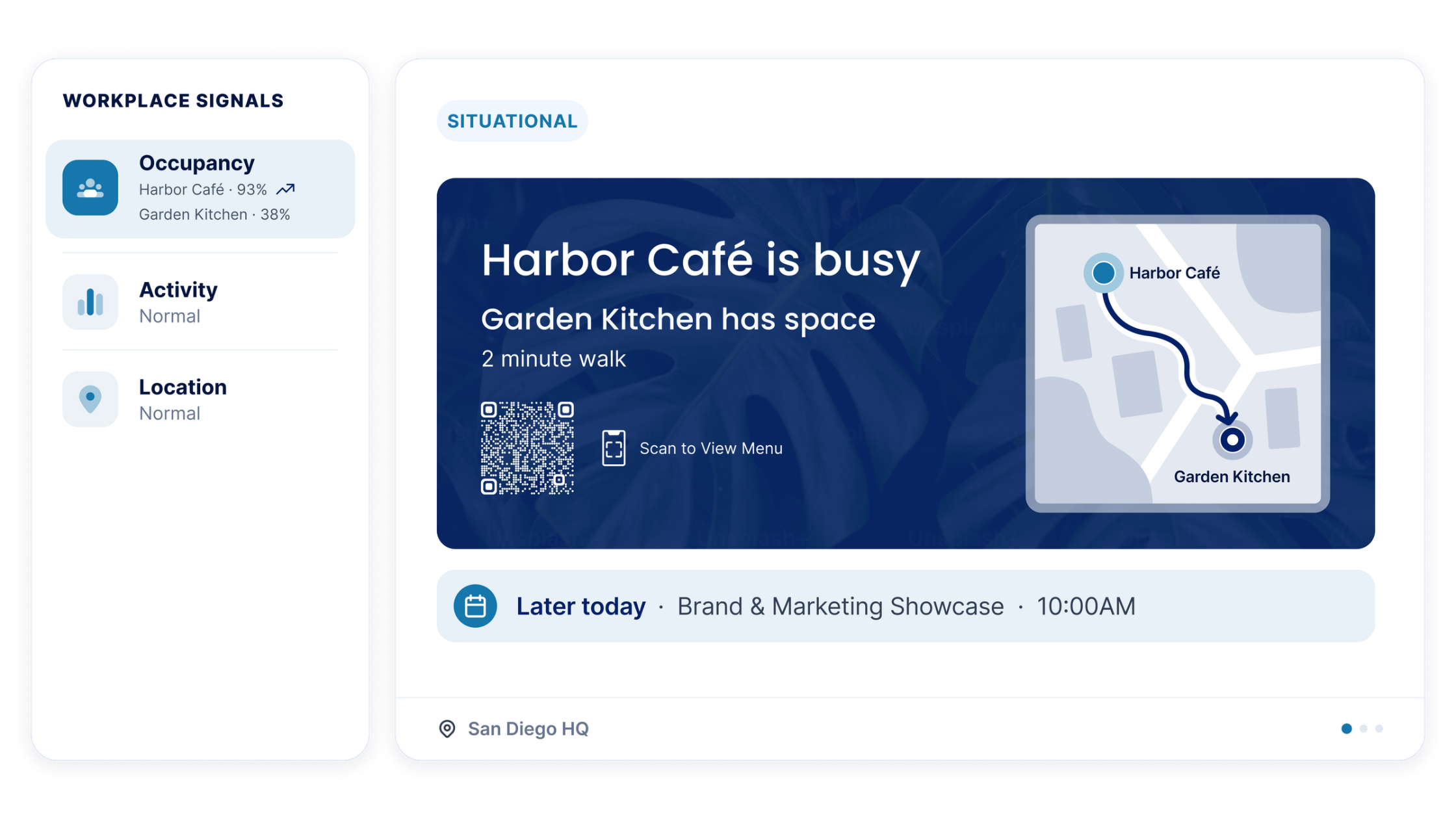
Situational Signage shifts the focus from the screen to what’s happening around it. Signals like location, occupancy, visitors, and workplace activity will help decide what’s most useful to show in a particular place at a particular moment.
Remember the lobby screen from that Tuesday, still promoting last week’s town hall? With Situational Signage, it could pick up that your client has arrived and switch to a welcome. Upstairs, as your floor fills up, the screen by the elevators could point people toward open space elsewhere.
Nobody had to predict those moments and build a rule for each one. Same Tuesday, same last-minute change of plans, and this time the workplace kept up.
What Appspace Context fixes in practice
A vision earns its keep when it solves everyday problems. Here are five we hear about all the time, and how context changes each one.
-
“Where do I go for that?” Time lost searching across tools
Employees lose time searching, switching between tools, and working out where a task even lives. Multiply a few minutes by every person, every day, and it adds up to a real drag on productivity.
Organic UI is designed to shrink that hunt. When the interface already knows your role, your location, and your schedule, it can put the right tool or action in front of you before you go looking.
-
Messages that miss the mark: generic internal comms
When everyone gets the same content regardless of role, location, or moment, people learn to tune it out.
Context makes what people see more relevant to who they are and where they are, on the intranet and on the screens around them. Relevant messages get read, which gives the important ones a much better shot at landing.
-
Rules, rules, and more rules: manual signage programming
Workplace and comms teams spend hours anticipating scenarios and configuring signage for each one. Then a floor closes, a schedule shifts, or an event runs long, and the screens are out of step again.
Situational Signage will let screens respond as conditions around them change. Your team sets the direction and spends far less time scripting every possibility by hand.
-
Employees doing the stitching: disconnected workplace systems
Planning one day in the office can mean one system for the desk, another for the room, and another for the guest. Each system works fine alone but your employee ends up being the integration.
When those systems share context, the day can come together as one experience. The booking, the visitor, and the screen in the lobby all know about each other, so your people don’t have to carry that around in their heads.
-
Spaces that can’t keep up with hybrid work
Today, people work from different locations, spaces fill up, and priorities shift by the hour. A workplace set up around last quarter’s assumptions feels out of touch fast.
A workplace that reads its own signals can adjust as the day unfolds. That makes coming in feel easier, and it gives workplace teams a building that helps them out.
Context makes your AI more useful, too
AI can give you an answer. At work, the right answer often depends on who’s asking, what they can access, where they’re working, and what they’re trying to get done.
Employees already sense this. Appspace workplace trends research found that 87% say a well-connected workplace is important to realizing the full value of AI tools.
A standalone AI tool sees one piece of the workplace. Appspace Context brings signals together from across it, which gives Appspace Intelligence, our built-in AI, more to work with. You get more relevant answers, better suggestions for what comes next, and an AI that can take action.
Here’s an easy way to understand that: Context is what the experience understands. Intelligence is the AI that does something useful with it.
We’re just getting started
Organic UI and Situational Signage are the first two examples of where we’re headed with Appspace Context. Both are coming soon, and we’ll share more on availability as development progresses. There’s a lot more we want to make with context, and we’re having a great time building it.
So we’ll leave you with the question that started all this. What if your workplace knew what you needed before you did?
See what we’re building with Appspace Context
Appspace Context FAQs
What is Appspace Context?
Appspace Context is Appspace’s vision for a workplace experience that understands the person, place, situation, and task. It brings together signals from across the Appspace platform and uses them to make each experience more relevant and responsive.
Is Appspace Context a product?
No. Appspace Context is an approach to how connected workplace information, technology, and experiences work together. Individual Appspace features, such as Organic UI and Situational Signage, bring different parts of that vision to life.
What is Organic UI?
Organic UI is an Appspace interface designed to adapt around the person using it. It uses context about the employee and their situation to show them the most relevant information, tools, and actions, while less relevant elements recede.
What is Situational Signage?
Situational Signage is an Appspace capability that lets digital signage respond to what’s happening in the physical workplace. Signals such as location, occupancy, visitors, and workplace activity help determine what a screen shows at a given place and time.
How is Situational Signage different from traditional digital signage?
Traditional digital signage is programmed around the device: where a screen is located, how it’s grouped, and rules set in advance. Situational Signage focuses on what’s happening around the screen, so content can change as conditions change without teams configuring every scenario by hand.
Are Organic UI and Situational Signage available today?
Not yet. Both were showcased at WOW26, Appspace’s annual workplace experience conference, and are coming soon. Appspace will share more on availability as development progresses.
How is Appspace Context different from Appspace Intelligence?
Appspace Context is what the workplace experience understands about the person, place, situation, and task. Appspace Intelligence is Appspace’s built-in AI, which uses that understanding to answer questions, create and summarize content, recommend next steps, and support actions.
What problems does Appspace Context help solve?
Appspace Context targets everyday workplace friction: employees losing time searching across tools, communications that feel irrelevant, signage that needs manual rules for every scenario, and workplace systems that don’t share what they know. It does this by connecting signals across intranet, digital signage, space reservation, visitor management, and AI.
Do you need the whole Appspace platform to benefit from Appspace Context?
No. Appspace Context can create value within the part of the workplace you manage today. As more experiences and signals are connected, Context has more information to work with and more ways to respond.

