

Collaboration displays: Your secret weapon for better workplace comms
If you’re leading internal communications or AV strategy, you’ll know the feeling: important updates get lost in inboxes, digital signage only reaches part of your workforce, and meeting room screens often sit idle outside of actual meetings.
Collaboration displays are an untapped channel that can transform the way you communicate across the workplace, making your messaging more visible, more consistent, and more engaging, no matter where employees are working from.
And the best part? You already have many of them in place.
This guide will help you to get the most from your collaboration displays and give you the key questions to ask when evaluating collaboration display solutions.
Looking for the bigger picture on how this fits into your workplace strategy? Take a look at our guide to Devices and displays: The visual heart of employee communication software.
What are collaboration displays?
Collaboration displays are the interactive or passive screens in your meeting rooms, huddle spaces, and shared areas. When not in use for video conferencing or presentations, they’re often left blank, or worse, running outdated screensavers.
But with the right platform behind them, these displays become high-impact comms channels. You can use them to:
- Extend comms reach without email overload.
- Share live and scheduled content like leadership updates and town halls
- Improve brand and message consistency across regions and roles.
- Strengthen hybrid engagement and alignment.
- Extend internal campaigns across every corner of the workplace.
How do collaboration displays help Internal Comms teams?
-
Get your message in front of more people – without depending on inboxes
Email open rates can be hit or miss. But employees see what’s on a screen right in front of them, whether they’re walking into a meeting or grabbing a coffee. Collaboration displays give you a golden moment to inform, engage, or inspire – right in context.
Use them to:
- Promote HR and DEI initiatives, campaigns, and events.
- Share content specific to a site or region.
- Reinforce safety, compliance, or operational updates.
- Tie in with digital signage, mobile app, and intranet for omnichannel impact.
-
Content that stays on-brand and on-message
With templated publishing tools, you can keep every screen looking sharp and aligned with your brand. Whether it’s a short video, image carousel, or a simple text alert, you’re in control.
-
Make real-time updates without IT
Need to update content fast? Crisis messaging, event changes, or leadership announcements can be published instantly – or scheduled for later – across multiple locations, all from a single dashboard.
How do collaboration displays make life easier for AV and IT leaders?

Collaboration displays should feel smart, not high maintenance.
Manage all your screens from one place
Whether you’re working with Cisco, Crestron, or Mersive displays, you can control and push content across mixed devices with no manual setup or screen-by-screen updates.
Give local teams some autonomy without losing control
You can set permissions so regional or departmental teams can manage relevant content, while maintaining corporate consistency and compliance.
Monitor health, usage, and ROI in real time
Get clear visibility into which displays are playing what, where, and when. Track engagement, spot issues early, and prove the value of your AV investment with real data.
How do collaboration displays support hybrid and remote collaboration?

One of the biggest challenges in the hybrid era is keeping everyone in sync – wherever they’re working from. Collaboration displays help bridge the gap between physical and digital workspaces.
Turn passive spaces into digital collaboration hubs
When not in use for meetings, displays can show project dashboards, team updates, or company news, so the physical workspace feels connected to the digital one.
Align messaging for in-office and remote teams
By using collaboration displays alongside your employee app and digital signage, you create a unified communications ecosystem. That means everyone sees the same updates, values, and initiatives whether remote, hybrid, or in the office.
Improve presence and participation
Use touch-enabled displays for interactive sessions or brainstorming. Stream all-hands meetings or town halls to break rooms, collaboration areas, or regional offices so everyone can feel involved.
How are organizations using collaboration displays in the real world?
A global professional services firm wanted to improve the reach of its internal campaigns. They already had Webex collaboration displays across meeting rooms, but outside of scheduled calls, the screens were going unused.
By connecting their workplace platform into these endpoints, the comms team began pushing weekly highlights, localized HR messages, and compliance reminders, all tailored to different regions. Meeting rooms turned into valuable message hubs, and the visibility of their internal comms increased dramatically. The AV team appreciated the remote content controls and saw a welcome reduction in device support tickets thanks to simplified screen management.
What to consider when evaluating collaboration display solutions?
-
Compatibility with your existing tech stack
You shouldn’t need to rip and replace what you already have. Look for software that integrates with your current AV infrastructure, like Cisco Webex, Crestron, or Mersive, and your collaboration tools like Microsoft Teams, Outlook, or Webex.
- Key question: Can we activate our existing meeting room displays without adding complexity or requiring new hardware?
-
Centralized management and publishing
Managing dozens – or hundreds – of displays across offices and time zones can quickly become unmanageable without a centralized platform. Prioritize solutions that allow you to manage all devices and content from a single dashboard.
- Key question: Can our comms and AV teams manage content and devices together from one place?
-
Flexible, on-brand content options
Whether you’re pushing company-wide news, location-specific updates, or campaign visuals, you’ll want flexibility without sacrificing consistency. Look for built-in templates, brand controls, and scheduling tools to support both global and local teams.
- Key question: Can we maintain brand consistency while enabling teams to localize or tailor content?
-
Security and scalability
Any connected device is part of your digital surface area – and it needs to be secure. Your chosen solution should support enterprise-grade security, user permissions, and content approval workflows. Bonus points for scalability as your needs grow.
- Key question: Is this solution secure enough for enterprise use, and can it scale with us?
-
Touch-enabled and IPTV/live stream support
Some screens will be used passively for signage. Others could become interactive hubs for real-time collaboration. Seek support for touch functionality, high-quality video, and live stream capabilities to maximize value.
- Key question: Can our displays be used for more than static content like live streams or touch interaction?
-
Analytics and performance insights
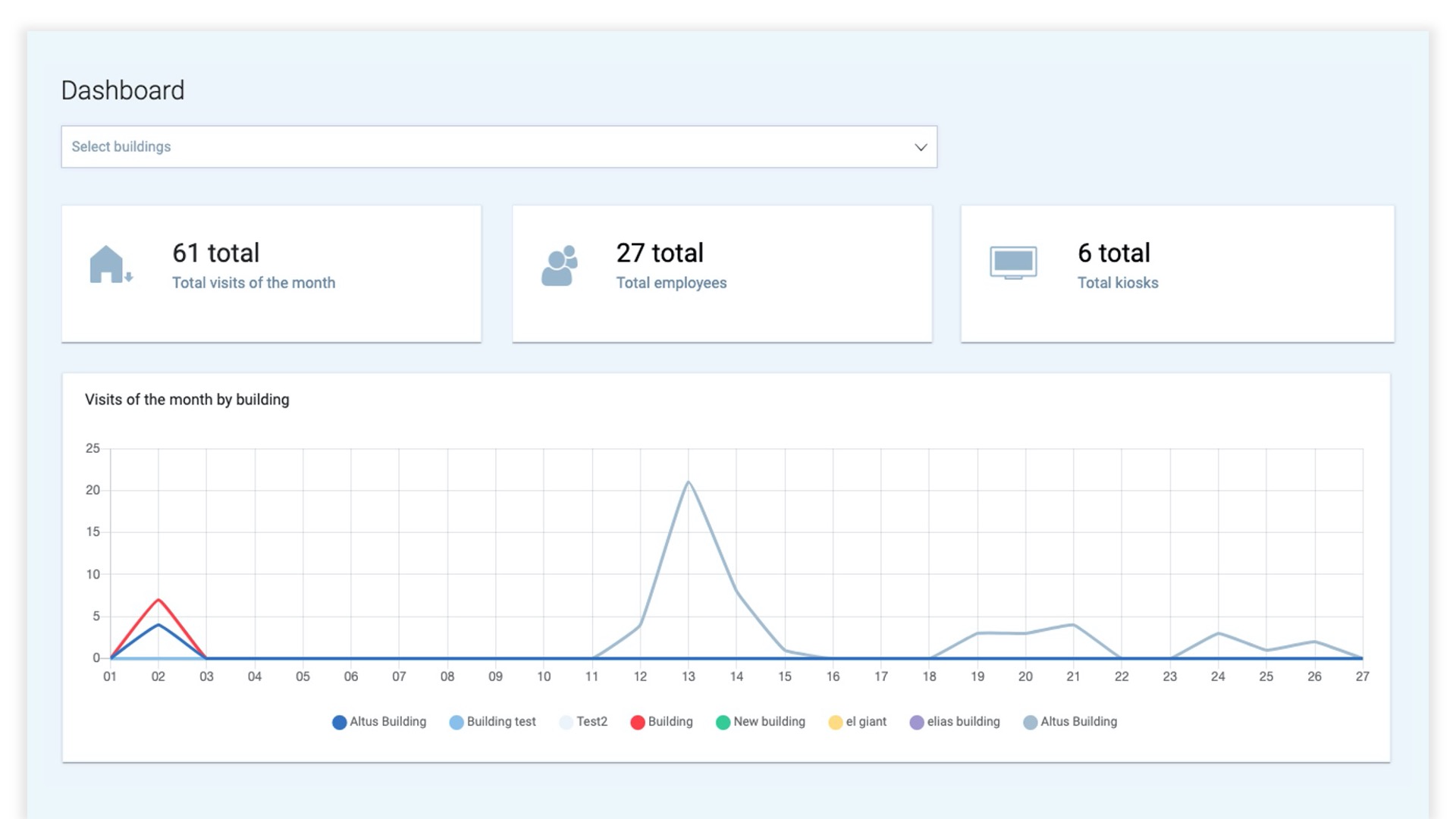
You can’t improve what you can’t measure. Look for built-in analytics that track display usage, content performance, and device health. These insights help you show ROI – and iterate with confidence.
- Key question: Will we be able to see what’s working and prove the impact of our display strategy?
Choose collaboration display solutions that are flexible, scalable, secure, and simple to manage across locations. The right setup will empower your comms and AV teams to engage employees better without putting a strain on your admin and IT staff.
One screen, endless opportunities
Collaboration displays offer a rare combination of visibility and simplicity. It’s valuable real estate that’s already part of your AV infrastructure. When paired with the right publishing and management tools, they deliver ROI for both communication and infrastructure teams.
And in a world where hybrid work has blurred the boundaries of where and how we engage, every screen counts.
- Find out more about Appspace Collaboration Displays.
- Take a closer look at Appspace, and schedule a demo to see it in action.

